What's new
Photoshop Gurus Forum

Welcome to Photoshop Gurus forum. Register a free account today to become a member! It's completely free. Once signed in, you'll enjoy an ad-free experience and be able to participate on this site by adding your own topics and posts, as well as connect with other members through your own private inbox!

Drawing a dashed circle (which is stroked/has an outline)


QuietCompany

Member
Messages
11
Likes
0
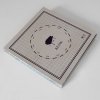
I'm trying to figure out how to make a dashed circle like the one in this photo (and also put a picture inside that circle). I've seen some tutorials on how to make the circle itself but can't get the same effect (mainly because the lines on the outside of the circle are not there, it's just the dashes and empty space in between.

I'd also like to know how to get the circle centred in the middle on a 2.5" x 3.5" size.

k2iNAUh.jpg
 

Attachments

  • k2iNAUh.jpg
    k2iNAUh.jpg
    107.3 KB · Views: 1
which software are you using Adobe illustrator or photoshop

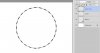
and if photoshop what version are you using if you have cs6 and later just draw a circle using shape tool with no fill and set the stroke to whatever color you like and then change the stroke style to a dashed version you can customise the settings same as illustrator.
 
On new layers add two more circle and stroke them to get the inside and outside lines. Select all the layers and use the align option on the move tool to center them on the canvas.
 

Attachments

  • ScreenShot001.jpg
    ScreenShot001.jpg
    29.7 KB · Views: 0

Back
Top