What's new
Photoshop Gurus Forum

Welcome to Photoshop Gurus forum. Register a free account today to become a member! It's completely free. Once signed in, you'll enjoy an ad-free experience and be able to participate on this site by adding your own topics and posts, as well as connect with other members through your own private inbox!

Eye Fix


faslav11

Member
Messages
15
Likes
0
Hey there,

I need your tiny help with Photoshop. I am new here.

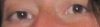
How can I fix to make eyes look more symmetrical? For example, one eye is smaller or bigger than the other. Can you help me to show me how to fix it?

Thanks so much and your advice would be gladly appreciated.
 
depending how much difference there is you should be able to do the majority of it using the liquify filter I suggest the pucker and bloat tools. 2nd option would be puppet warp if you have cs5 but slightly harder to use.
 
i have never tried with these features as you suggested. do you have a sample step by step how to do that? thanks hoogleman. :)
 
go to filter > liquify use the square brackets keys to size your brush to larger than the eye select the 4th icon down on the left hand side hover your mouse over the eye and left click it several times if that makes the size go in the wrong direction hold down the alt key and press again and again
 
Are you going to upload the whole image, or just that strip? Upload the whole image and I will work on it for you.
 
No problem man, I would suggest learning too use both those tools. They can both be very useful.
 
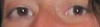
Duplicate the layer on the top copy use the liquify tool forward warp icon, (the top icon) using a large brush push the eyes to line them up as best as you can whilst maintaining the shape and apply it to the image then apply a layer mask to top copy and paint in black around the edges using a soft brush to mask it in and you should get something like this I also added some high pass sharpening to the image. this is done left handed so not as accurate you have to take in to consideration the rest of the image perfectly symetrical eyes could make the whole head look lopsided so balance it out you may have to adjust the whole image.
eye fix.png
 
How? Post the image, so I could show you that it is possible to do this with both of the techniques.
 
obviously will look better if you spend more time on it and do it gradually and obviously if your photo quality is better than the sample.
 
Lol never mind, his post wasn't loaded when I posted mine. Good job Hoogleman, nice liquifying haha.
 

Back
Top