What's new
Photoshop Gurus Forum

Welcome to Photoshop Gurus forum. Register a free account today to become a member! It's completely free. Once signed in, you'll enjoy an ad-free experience and be able to participate on this site by adding your own topics and posts, as well as connect with other members through your own private inbox!

filling the entire canvas with a repeat image


CyndiMig

Member
Messages
6
Likes
0
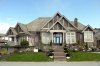
I have a picture of a house with the sidewalk at the bottom. I am trying to fill the remainder of my enlarged canvas with "sidewalk".

I know there has to be a way, but I can't figure it out!

I did try single row & single column marquee, but it gives me a striped pattern - not the exact sidewalk that the pic ends with.

Thanks!
 
Explain it more please, I'll certainly be able to help!
 
Increase the canvas size and then try the Content Aware Scale if you have CS5.
Unfortunately you're going to exaggerate some flaws they you need to follow up with the clone stamp tool.
 
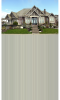
Either way, if it is the grass or the sidewalk, I can't figure out how to make it. This is what I am getting. I am trying to setup the front to a presentation folder where there will be a backdrop that print can be placed over.
exthouse.png
 
No you can't stretch it that far, I assumed a small percentage, you want to more than double the image size.
The image is way to low rez and there's not enough area to sample.
Pattern, Clone, Content Aware Fill, Content Aware Scale, are all going to give you unacceptable patterns.
Nothing other than getting a new street image and using that will give you acceptable results.
 
Ok thanks! The image is so low res because it is just a comp that I wanted to see what I could achieve before purchasing it.
 

Back
Top