HavingProblems
Member
- Messages
- 12
- Likes
- 2
Hi Guys
Pleasure to be here and hopefully get this answered
I’ve been reading online forums for over a week now trying to solve this problem and feel like I’ve tried everything so far. Here’s the issue:
I edit a photograph from a Camera Raw file to high contrast, grainy black and white, then when I try to flatten it or save it, it washes all the contrast out completely.
When I try to merge layers, flatten image or cmd+opt+e/cmd+opt+shift+e to a new file it does the same thing.
Here’s what I’ve tried to correct the issue:
I’ve tried saving it as a PSD file, a TIFF, a JPEG and a BMP file
I’ve tried calibrating my monitor (X-Rite i1 Pro)
I've tried soft proofing on and off (left off for now)
I’ve tried resetting my colour settings to import files into the working space as ProPhoto & Adobe RGB 1998
I’ve tried setting the import as the calibrated settings for the screen rather than ProPhoto or Adobe RGB 1998
I’ve checked that all files (apart from a Dodge/Burn Layer which has to be on Soft Light – never affected any files before) were set to normal
I’ve tried converting profiles from ProPhoto to Adobe 1998, Adobe 1998 to sRGB
I’ve tried going to preferences in User>Me>Library>Preferences>Adobe Photoshop CS6 Settings and manually resetting all relevant references
I’ve tried flushing and resetting all preferences
I’ve tried to uninstall and install Photoshop SC6 from scratch
And I've tried restarting the image from the raw file with the new install of CS6, done all the edits again manually...
And it still does the same thing.
Whenever I have adjustment layers on my file and have some contrast added that I want to save, it ‘flattens’ the whole image out
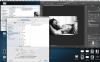
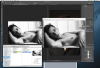
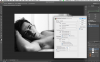
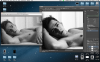
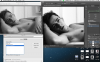
I've attached a couple screenshots to try and help explain, recording video wont work but may be a necessity if anyone needs it.
The last attachment is what it looks like in photoshop and another with my colour settings for the (calibrated) screen
Any Ideas? I’m racking my head trying to figure this out…
Thanks
Pleasure to be here and hopefully get this answered
I’ve been reading online forums for over a week now trying to solve this problem and feel like I’ve tried everything so far. Here’s the issue:
I edit a photograph from a Camera Raw file to high contrast, grainy black and white, then when I try to flatten it or save it, it washes all the contrast out completely.
When I try to merge layers, flatten image or cmd+opt+e/cmd+opt+shift+e to a new file it does the same thing.
Here’s what I’ve tried to correct the issue:
I’ve tried saving it as a PSD file, a TIFF, a JPEG and a BMP file
I’ve tried calibrating my monitor (X-Rite i1 Pro)
I've tried soft proofing on and off (left off for now)
I’ve tried resetting my colour settings to import files into the working space as ProPhoto & Adobe RGB 1998
I’ve tried setting the import as the calibrated settings for the screen rather than ProPhoto or Adobe RGB 1998
I’ve checked that all files (apart from a Dodge/Burn Layer which has to be on Soft Light – never affected any files before) were set to normal
I’ve tried converting profiles from ProPhoto to Adobe 1998, Adobe 1998 to sRGB
I’ve tried going to preferences in User>Me>Library>Preferences>Adobe Photoshop CS6 Settings and manually resetting all relevant references
I’ve tried flushing and resetting all preferences
I’ve tried to uninstall and install Photoshop SC6 from scratch
And I've tried restarting the image from the raw file with the new install of CS6, done all the edits again manually...
And it still does the same thing.
Whenever I have adjustment layers on my file and have some contrast added that I want to save, it ‘flattens’ the whole image out
I've attached a couple screenshots to try and help explain, recording video wont work but may be a necessity if anyone needs it.
The last attachment is what it looks like in photoshop and another with my colour settings for the (calibrated) screen
Any Ideas? I’m racking my head trying to figure this out…
Thanks