What's new
Photoshop Gurus Forum

Welcome to Photoshop Gurus forum. Register a free account today to become a member! It's completely free. Once signed in, you'll enjoy an ad-free experience and be able to participate on this site by adding your own topics and posts, as well as connect with other members through your own private inbox!

Illustrator Help going from a drawing on paper to vector


0honda

Member
Messages
10
Likes
1
I am trying to make a simple basic logo for my motocross race team.....me and my dad.....and I can't figure out how to go from a sketch I drew on notebook paper to a vector file. If anyone could give me any tips on how to do this or would be willing to do this for me, It would be very much appreciated. This is the logo I drew. I threw it into photoshop and cropped it and colored the numbers red. It shouldn't be very hard but I cant get it. I have the outline of the box that I used the shear tool on and made it 22.5 degrees which looked good. I have no clue on how to go about the text. I'm much more of a photoshop guy. :/
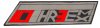
10Three.jpg
 
.ai I think. I'm not sure, but if there is a format that works with Cs4 software too that's what I'd like it in.
 
Okies! I think if you drag and drop the eps file into illustrator, it'll open, if not, you can open a new document in photoshop and then drag and drop the eps file to the photoshop document you just made, and it should come in as a smartobject, but you wont be able to edit it.

Idk if this holds true, but it's just a rule of thumb i've followed from my boss, he always said if you're making logos, always make them in either indesign or illustrator, so that the resolution always stays crisp ^_^ illustrator is just easier for me.. let me know if that helps! (hopefully the ai file is attached lol)
 

Attachments

Thanks Inkz lol i just spaced it :P I can explain it in a bit when i have a little more free time for sure ^_^
 

Back
Top