
What's new
Photoshop Gurus Forum

Welcome to Photoshop Gurus forum. Register a free account today to become a member! It's completely free. Once signed in, you'll enjoy an ad-free experience and be able to participate on this site by adding your own topics and posts, as well as connect with other members through your own private inbox!

Help!...I can't figure out what the problem is!


LawstCaws

New Member
Messages
4
Likes
0
Hi all,

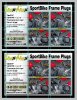
I am new to Photoshop and was assigned the task (by my business partner) to update some of our current product label/instructions to read 2012. However, I am having some trouble. As you will see in the screen print that I have attached, I was able to change the year to "12" in the top box by clicking the text button and then clicking what I wanted to change, however I can not do the same for the bottom set. Can you please help me figure out what the problem is? I just need to update the bottom to read "08-12 CBR 1000RR".
 

Attachments

  • Trouble Shoot .jpg
    Trouble Shoot .jpg
    137.4 KB · Views: 24
I am assuming the bottom set is a text layer and not an imported image right??

single click the text layer you want to change so that layer is hightlighted then double click the T in the preview icon on in the layer panel it should then highlight all the text for you to edit it if it has not been rasterised.
 
I tried that and I can now see where I can type new text but it will not allow me to delete the current text so that I can replace it with the right year.
 
probably because it is more than 1 text layer you need to change them individually. To find out which layer is which in the layer panels you will see a vertical row of eye ball type symbols, they toggle the layer visibility so work your way down them to establish which layer is what
 
Upload your psd (the same way you would upload a normal picture and I am sure someone will work it out for you.
 
It could be that you don't have the correct fonts installed... otherwise, Hoogle's instructions should work...
 
Already spammed 10 posts :/

Admin, delete him!
 
Oh lol :P

Learnt another thing today :P

Thanks for banning him :)
 

Back
Top