
What's new
Photoshop Gurus Forum

Welcome to Photoshop Gurus forum. Register a free account today to become a member! It's completely free. Once signed in, you'll enjoy an ad-free experience and be able to participate on this site by adding your own topics and posts, as well as connect with other members through your own private inbox!

How is this photo effect produced? Do you know???


ImageJock

New Member
Messages
2
Likes
0
I have been searching high and low on how Dub Edits on Instagram creates this effect on his photos and I have come up with nothing.:banghead:

Examples are attached and can be found here: instagram dot com/dub_edits

The effect I am looking for is what is actually done to the person. Almost a smoothing/HD/high clarity effect. Not the backgrounds and such. Not sure if it is an action or a plugin or what. Could anyone send me in the right direction? Thanks for your time.
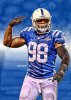
 

Attachments

  • BYAmjhhCAAAx3FC.jpg large.jpg
    BYAmjhhCAAAx3FC.jpg large.jpg
    302.9 KB · Views: 2
Let's hope you come back and show us just how you got on with it.
 
Topaz has webinars and videos on YouTube as far as how to use their plug-ins I believe Detail or Adjust5 is probably the main program used to get that effect fyi

Although there's some masking and replacement of the background involved
 
Topaz markets 14 plugins, each with many adjustments, and these almost always need to be combined with native PS tools and adjustments. Saying that one "should use Topaz" is about as uninformative as saying that one "should use Photoshop".

Go through my posts in this thread, starting with message #7:
http://www.photoshopgurus.com/forum...-know-how-generate-effect.html#post1533643749

Pay particular attention to this passage:

quote_icon.png
Originally Posted by Tom Mann
...That being said, I should caution you that using plugins like this is never a simple matter of clicking an Instagram-like preset button. To use such plugins effectively, you need to be proficient at standard Photoshop techniques such as quickly selecting a part of the image (eg, just the skin, or just the background) and performing separate actions to these areas. For example, after I used Topaz adjust to get the skin to look the way I wanted, the jerseys didn't look that good, so I masked part of the effect away from them. In addition, for drama, I wanted the background to have even deeper blacks than when it started, so I not only had to prevent Topaz from acting on it, I needed additional darkening of the dark tones. I achieved this by using a masked "Levels" adjustment layer on it, but used the blendIF sliders to prevent darkening of the colored lights in the background.

Because such tasks require a reasonable level of proficiency with PS, I don't recommend such plugins until the student is already quite facile with the tools built into PS. ...


Who said""should use Topaz"? Plug-ins are there to help people not proficient with Photoshop, to steer them in the direction of helpful plug-in is in my book completely legitimate solution. Not everybody that comes here for help is looking to be a professional with Photoshop. I understand where you're coming from Tom but I disagree.
 
@iDad: The word, "Topaz" was used as a collective noun in posts by Mike, Disturbed, and you. It is also used that way in many of the posts in the thread cited by Hoogle. Pointing out that one of the Topaz products may be useful certainly narrows the possibilities for the OP, and, you're right, is helpful, but it leaves such a large universe of things for him to explore that it could easily take him months to familiarize himself with all the Topaz products and narrow down the choice on his own.

I wanted to give him more definitive, detailed guidance and narrow it down a bit more for him.

Cheers,

Tom
 
I was getting in the impression that you were staring him away from Topaz. I understand where you're coming from now, I just don't see everybody wanting to be overwhelmed with too much detailed definitive guidance.there's nothing wrong with your approach it's appreciated. And 99.9999% of the time, right on the mark:thumbsup:
 
Hoogle posted the link in #2. I used Topaz only to get the "cartoonish" look....I think Topaz Clean and Detail were used in the link. I call that look "Topaz" as it seems to be quick and clean And straight up...The samples I did were quick, done only in Topaz without any PS work done.

I do agree and think that you need to know the ins and outs of PS...If you do it for a living. For quick grins and giggles, Topaz makes the whole process easy and thoughtless...BUT it does deliver.
 
Last edited:

Back
Top