Hello,
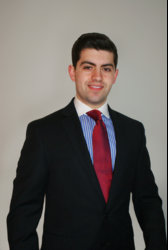
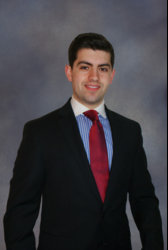
I need to submit a professional headshot for a job I'm starting this summer. I didn't have access to a photographer, so I just took some photos of myself and was hoping you generous gurus would help me make them look more professional/better quality/what you would expect from a headshot in a photo studio. I am an attorney, so the photo is supposed to be "serious." I have 2 photos of my upper body -- one wearing a gold tie and one wearing a red tie.
Gold tie -- for this photo, I think I look a little washed out with the white background/white shirt. Can you darken the background and make it softer like one taken in a studio?
Red tie -- for this photo, the shadow from the flash makes the photo look cheap and unprofessional. Can you correct that and darken the background similarly?
Also, this may be asking for too much, but since it is the middle of the winter, I look pale. Is it possible to make my skin look more naturally tan? I'm also attaching a photo of me in a navy tie from the summer so you can see my skin tone when it is tan. It is more olive as I am Italian.
I really appreciate the help, it is vital that these look professional, and I would be unable to do it without your help. Thank you so much!
I need to submit a professional headshot for a job I'm starting this summer. I didn't have access to a photographer, so I just took some photos of myself and was hoping you generous gurus would help me make them look more professional/better quality/what you would expect from a headshot in a photo studio. I am an attorney, so the photo is supposed to be "serious." I have 2 photos of my upper body -- one wearing a gold tie and one wearing a red tie.
Gold tie -- for this photo, I think I look a little washed out with the white background/white shirt. Can you darken the background and make it softer like one taken in a studio?
Red tie -- for this photo, the shadow from the flash makes the photo look cheap and unprofessional. Can you correct that and darken the background similarly?
Also, this may be asking for too much, but since it is the middle of the winter, I look pale. Is it possible to make my skin look more naturally tan? I'm also attaching a photo of me in a navy tie from the summer so you can see my skin tone when it is tan. It is more olive as I am Italian.
I really appreciate the help, it is vital that these look professional, and I would be unable to do it without your help. Thank you so much!