I'm not sure if this is a Photoshop issue, a Win11 issue or a computer hardware issue. I am using a brand new PC (Dell EBT2250—lots of horsepower). I'm also a new user of Win11 and a new user of Photoshop CC.
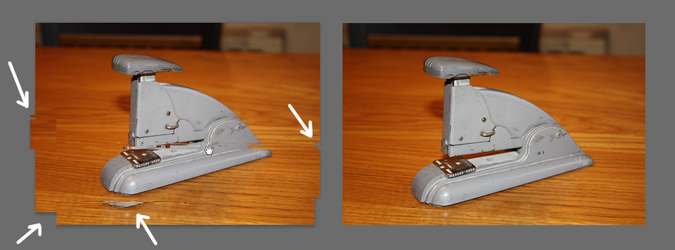
The issue is: when I have any image on screen in Photoshop, if I use the Move tool, Hand tool or the scroll bars, the image noticeably breaks-up while it's moving. I made a screen-capture video of this, but I can't attach videos here. Instead, the left-hand image below shows the image breaking-up in the midst of a move (see white arrows). The right-hand image is what it actually looks like when it's not moving.
Does anybody know what might cause this?
The issue is: when I have any image on screen in Photoshop, if I use the Move tool, Hand tool or the scroll bars, the image noticeably breaks-up while it's moving. I made a screen-capture video of this, but I can't attach videos here. Instead, the left-hand image below shows the image breaking-up in the midst of a move (see white arrows). The right-hand image is what it actually looks like when it's not moving.
Does anybody know what might cause this?