What's new
Photoshop Gurus Forum

Welcome to Photoshop Gurus forum. Register a free account today to become a member! It's completely free. Once signed in, you'll enjoy an ad-free experience and be able to participate on this site by adding your own topics and posts, as well as connect with other members through your own private inbox!

Image Breaks Up When Moved


Rich54

Guru
Guru
Messages
2,008
Likes
3,877
I'm not sure if this is a Photoshop issue, a Win11 issue or a computer hardware issue. I am using a brand new PC (Dell EBT2250—lots of horsepower). I'm also a new user of Win11 and a new user of Photoshop CC.

The issue is: when I have any image on screen in Photoshop, if I use the Move tool, Hand tool or the scroll bars, the image noticeably breaks-up while it's moving. I made a screen-capture video of this, but I can't attach videos here. Instead, the left-hand image below shows the image breaking-up in the midst of a move (see white arrows). The right-hand image is what it actually looks like when it's not moving.

Does anybody know what might cause this?
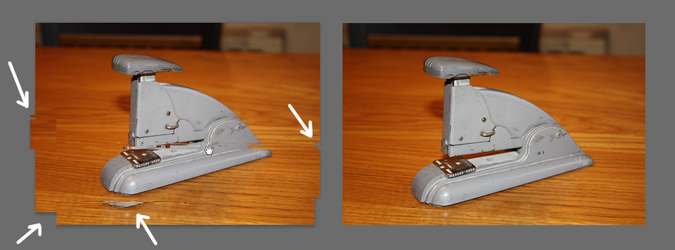
1780455467500.png
 
Hey Rich! Sorry you're having so many odd issues with CC! I've never had this type of issue, but I have had Ps become "sluggish" when dealing with large files sizes. What size is the file you're working with? I suspect it's something to do with the processor.

Screenshot 2026-06-02 at 11.35.00 PM.png
 
@IamSam,
The issue was happening with every file, whether big or small. This particular stapler image is a jpeg of 1500 x 1000 pixels.

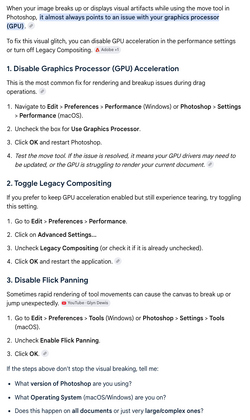
Taking your suggestions, I just now disabled my graphics processor in Photoshop preferences (flick panning had already been disabled) and the problem seems to have gone away. The same stapler image that was giving me trouble now moves perfectly smoothly.

I had been vaguely suspecting that the GPU might be involved, but I don't really know what a GPU does, so I was reluctant to mess with it. Any articles I've read say that the GPU enables "acceleration", without explaining what acceleration means. I'm beginning to suspect it's important in video games—which I don't care about—and not important in Photoshop.

Anyway, the problem seems to be solved for now. Many thanks.
 
For anyone who is interested...

Turning off GPU seems to have solved my image moving problems, but it had unintended side effects. For example, I really like the feature in Photoshop CC for customizing the color and thickness of pen paths. But this is disabled without the GPU. There are probably more surprises like this that I haven't found yet. For now, I have restored the GPU in my Photoshop preferences and I will learn to live with the image occasionally breaking-up on moves and scrolls.
 

Back
Top