
What's new
Photoshop Gurus Forum

Welcome to Photoshop Gurus forum. Register a free account today to become a member! It's completely free. Once signed in, you'll enjoy an ad-free experience and be able to participate on this site by adding your own topics and posts, as well as connect with other members through your own private inbox!

Magic Box Productions.


Oh for Chrissake!

Well-Known Member
Messages
83
Likes
7
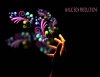
The swirlies and logo were done entirely in ILLY. Then put into Photoshop with the hand.

I know I could make it better, but this is as much as I'm willing to put into it right now.

Magic Box Productions.jpg
 
That's cool, I know you know ,but here is a suggestion anyway. I would add photo filter to the swirls, take a sample of the color of finger index finger tip and use that color in the photo filter probably 50%
 
I don't know what it is ?, but something just doesn't look right for me , I think the words magic box and swirls might be the problem for me, i just seem to think they don't go together. i would take no notice of me as this is just a personal opinion and not a critique about the actual art work which looks nice.
 
I was bored so I played around with your image and added a layer of photo filter to it I used the the glow of yellow on the skin of the hand used color mode and went all the way to 100% with preserve luminosity checked and I use the round shaped brush Soft edge and erased a few areas to get the color brightness on a few of those balls

View attachment 32199
Just messing around:thumbsup:
 
I love the swirls, very nicely done...

But to me, the lighting on the hand is to bright and not consistent with the light coming from the swirls.
 

Back
Top