What's new
Photoshop Gurus Forum

Welcome to Photoshop Gurus forum. Register a free account today to become a member! It's completely free. Once signed in, you'll enjoy an ad-free experience and be able to participate on this site by adding your own topics and posts, as well as connect with other members through your own private inbox!

Make inverted brush.


meamjw

Active Member
Messages
29
Likes
1
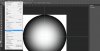
I've been trying to make what I think of as an inverted brush. I want it round but I want the outer edge to be 100% opaque fading to 0% in the center. I'm guessing there is a way to make the gradient tool do that but I haven't been able to figure it out. Anyone know how?
 
in a new large square document (better resolution brush) Use the elipse marquee tool to make your circle then do a radial gradient black to transparant and do your gradient in the marquee selection. Select all then go to edit > define brush preset and you will make your own brush
 
Make a circle and use a gradient set to black and transparent. Check reverse in the options bar to get the transparency in the middle if you need to. If you want the black all around the edges use a radial gradient, if you only want it on two edges use a reflected gradient. Save as a new brush.
 
I should add that anything white wont save to the brush that will be transparant so do it on a white background and whatever is gray to black will be the brush.
brush example.jpg
 

Back
Top