What's new
Photoshop Gurus Forum

Welcome to Photoshop Gurus forum. Register a free account today to become a member! It's completely free. Once signed in, you'll enjoy an ad-free experience and be able to participate on this site by adding your own topics and posts, as well as connect with other members through your own private inbox!

Need Help — Three Unrelated Questions


Rich54

Guru
Guru
Messages
2,001
Likes
3,877
After more than 15 years of CS5, I am now using the latest CC version of Photoshop and I'm trying to learn all the new functionality. I'm sure I'll be back here many times, but here are three questions to start:
  1. When I open an adjustment layer from the Adjustments panel, the Properties tab becomes active for that adjustment. But if I then delete that adjustment layer or go work on a different layer, the Properties tab remains open no matter where I go. If I want to add a new adjustment layer, I need to first physically activate the Adjustments tab. Is there any way to make the Adjustments tab be the active, default view?

  2. In CS5, my custom shape tool had 100 (or so) different vector shapes (banners, arrows, etc.) that I could choose from. In the new CC, there are only a very few shapes. Is there a way to import all the vector shapes that were available in earlier versions?

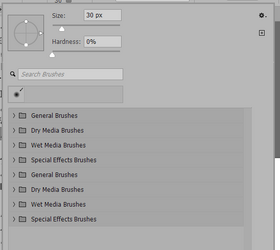
  3. I seem to have messed up my Brush tool selection settings. When I activate the brush tool, I now get this view of the active brush. When I want to switch among different brushes, I used to get a view where a window opened showing all available brushes with their icons, and I could just pick one. I'm not sure if I accidentally clicked something in CC to get what you see here, but I can't figure out how to get back to the standard brush selection screen.

1779765800833.png
 
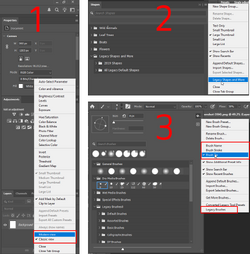
1. Adjustment and Properties panel -
No way to automatically do this. You will have to stack them in the side panel, like image to quickly access them both. If you prefer old small icons you can switch them from the hamburger menu.

2. Legacy Shapes -
  1. Go to Window > Shapes.
  2. Click the "Hamburger" menu in the top-right corner of that panel.
  3. Select Legacy Shapes and More.
  4. A new folder will be added in library containing all the classic assets.

3. Brushes Panel -
  1. In the Brushes panel, move all your brushes which you regularly use. Shift select than drag and drop.
  2. Click the gear icon in the top right
  3. Uncheck 'Brush Name' and 'Brush Stroke' and Check "Brush Tip"
  4. You can also restore old brushes. Click 'Legacy Brushes' at the bottom of the same menu.


1779792067783.png
 
In CS5, my custom shape tool had 100 (or so) different vector shapes (banners, arrows, etc.) that I could choose from. In the new CC, there are only a very few shapes. Is there a way to import all the vector shapes that were available in earlier versions?
If you saved any of your brushes (abr) or shape (csh) files, you can re-install them. If not, you can expand "Legacy Shapes" as described above, or search online for the shapes you would like to have.

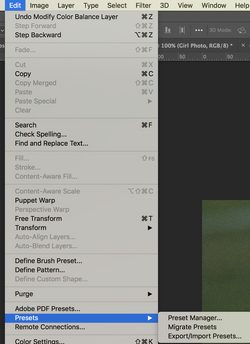
Go to EDIT > PRESETS > Use Preset Manager or Migrate
Screen Shot 2026-05-26 at 9.23.36 AM.png

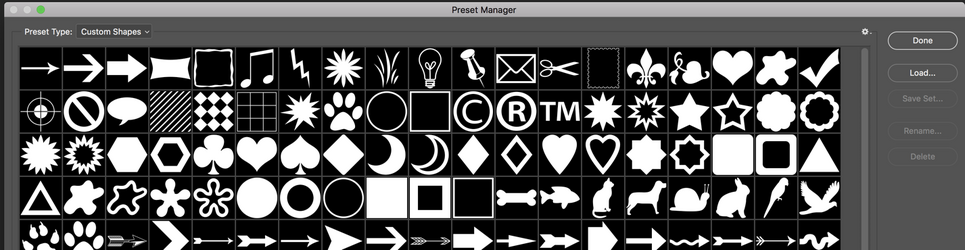
In the Presets Manager > Select CUSTOM SHAPES in the Preset Type window, then click load.
Screen Shot 2026-05-26 at 9.25.29 AM.png
 
@Akshat and @IamSam ,
Thanks, these instructions worked perfectly. For the brushes, it was the legacy brushes that I was searching for.


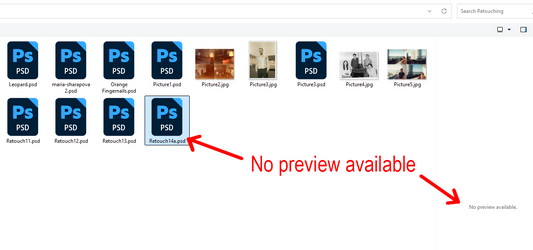
I have a new question. In Photoshop File>Open, there is no preview available when I click on a PSD file. However, in the "Home" page of Photoshop, they list my most recent documents and the previews do appear there. Is there any way to activate the previews in Photoshop File>Open?


1779812008994.png
 
@Akshat and @IamSam ,
Thanks, these instructions worked perfectly. For the brushes, it was the legacy brushes that I was searching for.
I have a new question. In Photoshop File>Open, there is no preview available when I click on a PSD file. However, in the "Home" page of Photoshop, they list my most recent documents and the previews do appear there. Is there any way to activate the previews in Photoshop File>Open?

Many features have changed in recent versions, and several options in the settings menu have been rearranged.

but probably its this one
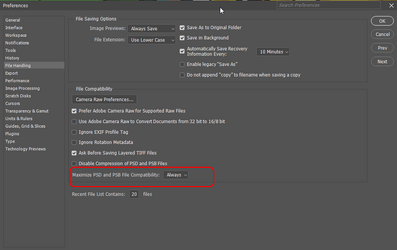
Settings > File handling > Maximize PSD and PSB File Compatibility > set this to always
1779815037065.png

I once tried to maintain a Photoshop wiki for optimizing settings, but I haven't updated it in a while, so a lot of information is outdated.
If anyone is interested in contributing, you are more than welcome:


If none of the options work
install Icaros, and manually add PSD, Ai or any other file type to the thumbnail filetype list.

https://www.videohelp.com/software/Icaros
 
@Akshat
In the File Handling preferences, the feature you mentioned was already checked and set to Always, so that didn't work. Having thumbnail preview seems like such an obvious thing that everybody would want. It's strange why Adobe would no longer offer it when it used to be there in older versions.

I will investigate the Icaros download. Thanks, again.
 

Back
Top