What's new
Photoshop Gurus Forum

Welcome to Photoshop Gurus forum. Register a free account today to become a member! It's completely free. Once signed in, you'll enjoy an ad-free experience and be able to participate on this site by adding your own topics and posts, as well as connect with other members through your own private inbox!

Panorama Issue :(


5thumbs

Member
Messages
9
Likes
2
Hi

I've been trying to stitch photos in CS2.

I tried combining two images exported from Lightroom and as a separate exercise I tried the same technique on 3 different images (jpegs) opened directly from Photoshop (in order to rule out any incompatibility between lightroom/photoshop).

In both cases I selected the advanced blending option in the photomerge facility in photoshop.

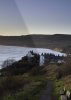
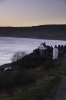
On both occasions the result was a strong vertical diagonal shaded line between the pictures when merged, almost as if they had been taken at different exposures. I tried to include the picture below but because Ihave less than 5 posts it wont let me I'm afraid. The 2 images were taken on the same manual settings within about 5 secs of each other.

Anyone experience this or have any suggestions - thanks
 
It was actually set to manual. I'm 100% sure of this as I was on a landscape photography workshop and the camera was at manual all day.

The other thing is that I would have expected the shading to a vertical line if that was the case rather than diagonal. Something obviously not right

Oh well..
 
Could you post the two original images before merging please.
 
I have issues with the merge points in some areas just need the originals to make my comparison thanks.
 
well thanks but not really.....! The light in these images is too flat to make the image v interesting per se - this is just an example of the issue I have been encountering.

What I was trying to understand was why the line was appearing in the first place and what I could do to prevent it as it is happening on other images also. I have been using PS cs2. What did you use to merge them ?
 
Ahh I get ya :P
My friend used to encounter a similar issue but upgrading his camera seemed to fix it. I believe a lot of cameras have problems with consistent light exposure in a dimmer sky. I use photoshop to fix lighting on shots that typically need it . :)
 
No prob appreciate your help. A question (or two) - did you use the File-Automate-Photomerge option in PS to do this? If so did you then have to tweak it to make it look ok?

I'm trying to determine wheter this is a PS issue or camera issue. The camera was set to manual and the shots were taken within 5 secs of each other. I use a Nikon D7100 for what its worth...
 
Im not familiar with the automated merging, i'm running a pretty old version of PS :P

I merged them the good old fashioned way, by layering them on top til they align, then feathered cutting the topmost image until a seamless merge is created.

I DID have to adjust the lighting on one of the images because as you said, there is a difference in lighting in the two pictures, so I don't believe it is a PS Issue. Although with a camera like that, I would expect some consistency for sure :o

As an experiment, you could take the camera out and take two identical shots without moving the camera (tripod if possible) and take the shots in quick succession. Bring them in and lay them side by side and check the exposure in the sky. you might find that its something as simple as re-calibrating the white balance or messing with the shutter speed that fixes it.
 
OP: "...The light in these images is too flat to make the image v interesting per se..."

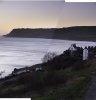
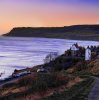
I wouldn't be quite so negative about your very nice shots. Juiced up a bit, I rather like your image, but then, my tastes tend to be more on the gaudy / painterly / graphic side, LOL. (see below) If it's too much for one's taste, one can always blend back in some of the original.

Seriously, tho, I've rarely seen a stitched or an HDR image that couldn't benefit from a bit of color and tonal tweaking after stitching/merging. It's quite common to do this, but some photographic purists don't approve. ;-)

Tom
 

Attachments

  • mrgd-tjm01_ps01b-698px_wide-01_usm_glam_glo.jpg
    mrgd-tjm01_ps01b-698px_wide-01_usm_glam_glo.jpg
    212.8 KB · Views: 14
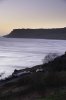
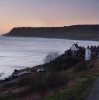
That definitely improves my version Tom (as did Keebs version). Makes me forget the hour I spent last Sunday at 6am in the freezing cold and rain waiting for the sun to show (which it did shortly after the original was taken). Here's a pretty straight version I took about 20mins later.

This is one image rather than a merge and with minimal PP (increased contrast and a slight grad on sky) but all the better for the light as I'm sure most would agree!

Out of interest could you give me any tips as to how you dealt with that ugly line in my original panorama?

Robin hoods1.jpg
 
Hi 5thumbs -

A few technical points:

1. I can't answer your question about removing the diagonal line since I "cheated", and, to save time, I started with Keebs very nice version instead of trying to stitch them together myself. That being said, I've never been a big fan of Photoshop's automated stitching (or, for that matter, their implementation of HDR merging). I don't do very much stitching myself, but I was into it a few years ago. At that time, I demo'ed quite a number of programs and liked the following ones (in decreasing order of preference):

http://www.ptgui.com/
http://www.kolor.com/panorama-software-autopano-pro.html
http://hugin.sourceforge.net/
http://research.microsoft.com/en-us/um/redmond/groups/ivm/ice/

If the last one is still available for free, it would be a good one to try.

2. FWIW, I looked at the EXIF info on the component images that you posted, and they seem to have been taken more like 20 seconds apart, not "within 5 seconds". At that time of day, that might just be long enough to see some appreciable changes in the illumination (which could lead to stitching problems).

3. From the metadata, while you turned off auto-exposure, it appears you did not turn off auto white balance. That could also cause a bit of a discrepancy between the two images.

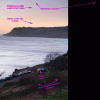
4. Your zoom lens introduces appreciable geometric distortion and vignetting. Below is a GIF that shows some of the problems. These two lens characteristics can give simple stitching methods serious problems. Once Adobe came out with their lens corrections, I always corrected for these issues before attempting to stitch. I believe your lens is in the Adobe database, so you could use either Lightroom or ACR to do this.

HTH,

Tom
 

Attachments

  • DSC_0933-Edit-4-LHS_RHS-acr0-p04a_698px_square_for_GIF_annotated.gif
    DSC_0933-Edit-4-LHS_RHS-acr0-p04a_698px_square_for_GIF_annotated.gif
    347.8 KB · Views: 15
BTW, I just saw your "straight", single exposure version, and strongly prefer it to any of the above, especially my own. :-)

One just can't beat good lighting, LOL.

Cheers,

Tom
 
Tom - wow that's amazing and makes perfect sense once you flick between the two images. That kind of analysis is beyond me but is incredibly helpful. I've just got light room (about 2 weeks ago) so I will go back and use the lens correction feature then maybe try again.

I'll also look at those programmes you mention - not famiar with them but very interested to know more. Thanks to you and Keebs for your tremendous help and for the compliments on the single shot image. :)
 

Back
Top