What's new
Photoshop Gurus Forum

Welcome to Photoshop Gurus forum. Register a free account today to become a member! It's completely free. Once signed in, you'll enjoy an ad-free experience and be able to participate on this site by adding your own topics and posts, as well as connect with other members through your own private inbox!

Pen Tool loop error


JazKW347

New Member
Messages
3
Likes
0
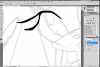
For some reason my pen tool wont make straight lines when pathing, all it keeps doing is making a loop where a straight line SHOULD be. Any help?
pentoolloopingerror.png
 
i got this, it turns out that it is because the tangent line of the first pen curve you made is too long.

try it again but use several anchor points with shorter tangent lines and you should get the line that you want.
 
I kind of fixed it on my own, but I have tried using shorter lines and ended up with tangents unless after i make the second point I take it and re plot it a second time in the same spot.
 
It's not an error, it's working as it should. When you drag a point it becomes a bezier curve. To change it, use the Covert Point Tool in the pen tool menu, or while using the pen tool just hold down the alt key.
For your example, hold the alt key and drag just the lower handle back to the center point, this will leave the first part of the curve, but it will eliminate the second part of the curve.
 

Back
Top