What's new
Photoshop Gurus Forum

Welcome to Photoshop Gurus forum. Register a free account today to become a member! It's completely free. Once signed in, you'll enjoy an ad-free experience and be able to participate on this site by adding your own topics and posts, as well as connect with other members through your own private inbox!

Photoshop CS5.1 Missing sections


237

New Member
Messages
3
Likes
0
Hi there yes i am a total newbie to photoshop. I have used other applications but this one is a vast leap!
However i have one problem which i cannot get any information on. I will post the screens if i can to give better idea where i am coming from.
ok i was following a tutorial but upon reaching a certain section of it i could go no further as the application i was watching seemed to be different than mine although the tutorial was for CS5?
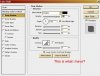
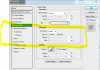
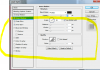
It shows what can only be described as the Layer Screen? now in this screen you can adjust colors. Left hand box has Drop shadow and inner shadow and many more, however on my screen the section which has Elements in it is missing.
I only have structure and quality? I am sure i had this problem on an earlier version some years ago but never got round to hanging onto it.. Anyway help please how to sort this out as everything else seems to be working or there so far?.. Thank you.:question:
 

Attachments

  • missing screen 1.JPG
    missing screen 1.JPG
    75.4 KB · Views: 20
  • adobe screen 2.JPG
    adobe screen 2.JPG
    58.8 KB · Views: 20
Your first screenshot has outer glow highlighted in the left panel, thus you have the option for it in the right panel. Your second screenshot has drop shadow highlighted in the left panel, so options on the right panel are different for drop shadow.
 
Your first screenshot has outer glow highlighted in the left panel, thus you have the option for it in the right panel. Your second screenshot has drop shadow highlighted in the left panel, so options on the right panel are different for drop shadow.

The first slide is not mine it was only used as a guide so that people would know what i was talking about.
It does not make any difference what i select in the left panel even if i select Outer Glow i still do not get the Ellements screen that you see in the first slide..
Thanks for your help.
 
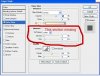
it is part of the GUI for the blending options panel if you tick and highlight the innerglow or outer glow it is there automatically
if it is not highlighted in blue you wont get the elements
selected.PNGnot selected.PNG

If you are not getting this then you have a corrupt version of photoshop and need to reinstall it
 
The first slide is not mine it was only used as a guide so that people would know what i was talking about.
It does not make any difference what i select in the left panel even if i select Outer Glow i still do not get the Ellements screen that you see in the first slide..
Thanks for your help.


actually it makes all the difference...

trust us, we know this program very well
 
No probs thanks for all the help will have another look later..
If all does not work i will try reinstalling the programme again.
If that does not work than i will be back.
I am sure you all know what you are talking about that's why i came here.
Thankyou!!
 
i also installed CS5.1 today and i didnt had any problems, i would have to go with Hoogle that your software might be curropt or not properly installed.
 
i thought that as well that maybe there is some difference in 32 bit and 64 bit versions but it doesnt seem right.

Well I just know that if PS is not loading in 32 -64 bit that certain options are not avaiable. Certain filters, like light effects are not there unless you are loading in 32bit. Thought maybe it could be something like that. It was just a guess. Good luck
 

Back
Top