What's new
Photoshop Gurus Forum

Welcome to Photoshop Gurus forum. Register a free account today to become a member! It's completely free. Once signed in, you'll enjoy an ad-free experience and be able to participate on this site by adding your own topics and posts, as well as connect with other members through your own private inbox!

Photoshop + Excel Help


Jalke

Member
Messages
5
Likes
0
Hey there, I'm trying to import my excel.csv file into Photoshop to quickly create multiple copies of my design through excel variables.


I need help with empty cells & putting picture icons into my text so that it shows up when imported / created.


The Icons I'm trying to implement (other photoshop files) are supposed to be part of the text, so appear within a sentence, but I'm unsure how to implement it into my excel.csv spreadsheet for it to then show up in the final design. Think of it like emote icons :rocker: within a sentence in MSN.


As for empty cells, not all of my variables will Always have something there. The reason being, is because; let's say I have a text box - I'm not quite sure how to succinctly created multiple sentences within excel to then appear in my final design. So have created 3 Photoshop text boxes to facilitate that concern. However, if there's an empty cell in excel (even with a Space in it) it won't import.


Can anyone help ? Thank you for taking the time to read this.
 
If I am understanding what you are trying to do, it can't be done - at least not easily.

First, Micro$oft and Adobe hate each other and there's no way either one would voluntarily integrate with the other.

Second, Excel and I are on intimate terms. I use it every day in my professional life. You're trying to force it to do something it was never designed to do. If you must use an Office product for this purpose, Access is the better choice. I don't know Access very well so I can't help you set that up but I'm sure someone can.

Third, importing a spreadsheet or text database in to Photoshop is the wrong way round. The better way would be to import your graphic into a program like Micro$oft Publisher or even Word, which will integrate the variables much more easily.
 
Thanks for the response Sierraccr,

Ah, that's quite annoying. I'm not a professional in this field, nor am I convinced my method is best - in fact, the whole process I've been doing has been in itself, a journey of self-teaching to get a final product to work. Elsewhere, the suggestion was this

Per chance do you know of any tutorials I'd be able to have a look at then? Your method is completely alien to me..
 
I'm not 100% sure if this fits your needs, probably something easier out there. We use this all the time though when creating adressed flyers and what not that use varibles. You can essentially make one or more designs that varies depending on what information your excel contains.


However it is a professional tool and thus costs, they have a trial version though. :)
http://printshopmail.objectiflune.com/en
 
I'll be sure to check that out.

Allows me to explain the nature of my project - I'm simply creating cards. Not so much playing cards, but similar to popular card games, like Pokémon or Magic: The Gathering.
 
Do you have a design and spreedsheet available so one could take a look?

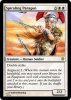
You mentioned picture icons in your first post, I looked up a random Magic: The Gathering card could you please indicate on the card what you want imported to your design?

magic__the_gathering___spiraling_paragon_by_peterrab-d4yr8w6.jpg
 
Oh hey sure - at the moment I've set up a primitive Alpha Template design. It's not meant to be done to a professional grade, & thus is a wee bit quirky. The Template itself isn't relevant after seeing your MTG card example which'll cover the missing parts succinctly.

1) "Double strike" on one line, & then "Augment 2" two lines down. Of course within Photoshop this is easily done, but when designing copious amounts of cards, intricate editing for each & every card is no doubt a laborious process - the same with editing any value on all the cards. So in order to process many cards quickly, I used excel. The problem is, within a .csv spreadsheet, I can't add multiple lines within a cell. What I did to rectify this, was create 3 text boxes that would overlap in Photoshop, but then I would always have to have a visible letter present to import the data. So I'm a little stumped how doing what that card did (officially that is) with my dilemma.

[TABLE="width: 500"]
[TR]
[TD]Title[/TD]
[TD]Picture[/TD]
[TD]Cost[/TD]
[TD]Life[/TD]
[TD]Attack[/TD]
[TD]Abilities[/TD]
[TD]SAbilities[/TD]
[TD]Flavour[/TD]
[TD]Artist[/TD]
[TD]Copyright[/TD]
[/TR]
[TR]
[TD]A2 Buzzard[/TD]
[TD](Image Directory)[/TD]
[TD]2[/TD]
[TD]2[/TD]
[TD]2[/TD]
[TD]Double damage against (F) cards.[/TD]
[TD][/TD]
[TD]I can fly.[/TD]
[TD]Picasso[/TD]
[TD]Creative Commons
[/TD]
[/TR]
[/TABLE]

So in the above example, I'd be stuck at the "SAbilities" column which'd have to be filled with a " . " or other small symbol to have a successful importation into Photoshop.

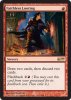
2) If we were to look at this card instead;

MTG_card_02.jpg

Notice how within the text, there is a small 2 in brackets (an image) along with a small circular fireball (another image) adjacent to it. In my card, I'd very much like to be able to incorporate such images in my text.

[TABLE="width: 500"]
[TR]
[TD]Title[/TD]
[TD]Picture[/TD]
[TD]Cost[/TD]
[TD]Life[/TD]
[TD]Attack[/TD]
[TD]Abilities[/TD]
[TD]SAbilities[/TD]
[TD]Flavour[/TD]
[TD]Artist[/TD]
[TD]Copyright[/TD]
[/TR]
[TR]
[TD]A2 Buzzard[/TD]
[TD](Image Directory)[/TD]
[TD]2[/TD]
[TD]2[/TD]
[TD]2[/TD]
[TD]Double damage against (F) cards.[/TD]
[TD][/TD]
[TD]I can fly.[/TD]
[TD]Picasso[/TD]
[TD]Creative Commons[/TD]
[/TR]
[/TABLE]

So under the "Abilities" column, you'll notice an " (F) " symbol which I'd like to be an image (another Photoshop image coincidentally) within my excel spreadsheet, to add into my Photoshop design automatically like the "Picture" column; note that I'm working with CSV hence the inconvenience.

Haven't come round to testing the Printshopmail or Publisher yet - I'm tackling this from the excel side, my partner in crime handles the Photoshop affairs.
 
I use Excel every day and I may have some suggestions for your Excel issues:

First, in the situation where you cannot import any blank cells from Excel to Photoshop, one way around this is to enter any random text---such as the letter X---into the cell that you want to be blank. Then change the color of the font in that cell to be white, so that the text is the same color as the background of the cell. Excel will recognize the text as being present, but it will be invisible.

Your second situation---embedding little symbols within strings of text---is a bit more tricky:
Type a string of text into a cell, such as "Richard is a wonderful man". Go into the Excel text editor (the F2 key) and highlight any portion of that text, such as the word "wonderful", and change the font to Webdings. Webdings (along with Symbol and Wingdings) are special fonts that change ordinary text into symbols. The hard part is knowing what text to enter to get the symbol you want. I never use these symbols and I'm not very good at working with them. But I do know they exist and may serve your purpose.

Good luck
Rich
 
Rich54,

First, I tried that method, but it fails at 2 points. One, it looks invisible on excel, but will come across as white on the Photoshop template. Second, since I'm saving it in CSV (how Photoshop demands variables to be imported) it automatically changes everything to plain black text.

Second, the symbols being implemented are custom - not known fonts. If there were a way to make a custom "font" which used my symbols.. imported from my Photoshop images.. that..might work.. I'd have to research that now.

Thanks for the ideas.
 
Second, the symbols being implemented are custom - not known fonts. If there were a way to make a custom "font" which used my symbols.. imported from my Photoshop images.. that..might work.. I'd have to research that now.

I had forgot about this, sorry...

I asked about this at work today and apparently we use this method for including variable company logos and such into text. I'll ask what we use and how to do it tomorrow. if you havn't solved this already. :D
 

Back
Top