What's new
Photoshop Gurus Forum

Welcome to Photoshop Gurus forum. Register a free account today to become a member! It's completely free. Once signed in, you'll enjoy an ad-free experience and be able to participate on this site by adding your own topics and posts, as well as connect with other members through your own private inbox!

Photoshop Watercolor


Very nice however I do not like the large drip maks coming down from the top.
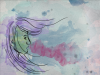
Yeah, I couldn't decide if I liked them or not. I guess it kind of takes away from the water color aspect of it, but I just wanted something to fill in the space a little more. Here it is without them:
watercolor2.png
 
Really nice piece, looks natural and water colored. I have to both agree and disagree with Hoogle, I like the drip marks but I think they'd be better if they were maybe a little bit more transparent/faded. Overall really impressive and well done! :D
 
Really nice piece, looks natural and water colored. I have to both agree and disagree with Hoogle, I like the drip marks but I think they'd be better if they were maybe a little bit more transparent/faded. Overall really impressive and well done! :D

Thanks for that suggestion! I think I like it better like this. I already had the opacity down to 50% but it looks better even less than that :)
watercolor3.png
 
Very nice, care to share a bit how you did this?
I agree with Hoogle about the drip marks, I still like the image in Msg 3 the best.
Less and thinner may work though,
 
Very nice, care to share a bit how you did this?
I agree with Hoogle about the drip marks, I still like the image in Msg 3 the best.
Less and thinner may work though,

Sure, I mainly took tips from this tutorial: http://danidraws.com/2006/12/27/create-a-watercolor-painting-in-photoshop/
And then I used a few brushes I found online, added a very faint vignette, and of course just a regular round brush for the girl's outline. It helps to set blend modes of either the brush you're using or the whole layer to multiply so the color has that watercolor type feel to it.
 
Last edited:
This is truly delightful jessicayla. Thanks for your description of the process and tutorial link.

I'm with Jonathon; I agree & disagree. I like the image with or without the drips but I feel like it is better with them and better with the lowered opacity. They give it a fuller, more dimensional feeling. If I have any problem with them, it is that they are rather too uniform in size and thickness.

Keep posting your stuff :mrgreen:
 

Back
Top