Hello everyone.
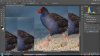
I've just installed CS6 and am having issues with the image displaying properly. It looks fine in the ACR window, but when it opens into Photoshop it the layer only shows certain parts of the whole image, not the entire image. When I zoom in and out sometimes multiples of one section of the image show, but I simply cannot see the image in its whole self. I've never ever encountered this in my life. Any help would be much appreciated. Here is a sample image of what I see at times.
I've just installed CS6 and am having issues with the image displaying properly. It looks fine in the ACR window, but when it opens into Photoshop it the layer only shows certain parts of the whole image, not the entire image. When I zoom in and out sometimes multiples of one section of the image show, but I simply cannot see the image in its whole self. I've never ever encountered this in my life. Any help would be much appreciated. Here is a sample image of what I see at times.