What's new
Photoshop Gurus Forum

Welcome to Photoshop Gurus forum. Register a free account today to become a member! It's completely free. Once signed in, you'll enjoy an ad-free experience and be able to participate on this site by adding your own topics and posts, as well as connect with other members through your own private inbox!

Print matching


Zombie

Member
Messages
17
Likes
0
I am having a real hard time getting photoshop and the moniter and my new printer to match colors. I might be over thinking and trying too hard. I have Photoshop CS5 Extended and windows 7 and the printer is a Canon PIXMA Pro 9000 Mark 2 with a 20" Dell lcd monitor. I do have photoshop set to working with CMYK. Can anybody recomend a tutorial or give me some help? Thanks everyone!
 
........................ I do have photoshop set to working with CMYK. Can anybody recomend a tutorial or give me some help? Thanks everyone!

No tutorial needed, stop using CMYK when printing to your Pixma Pro 9000.
From Adobe: About desktop printing

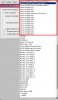
Use View|Proof Setup|Custom|Device to Simulate enter the exact paper your using.

paper.jpg

Be aware of the obscure codes Canon uses for their paper.

MP = Matte Photo Paper
PR = Photo Paper Pro
SP = Photo Paper Plus Glossy
GL = Photo Paper Plus Glossy II
SG = Photo Paper Plus Semi-Gloss

In the print dialog box make sure Photoshop Manages Colors.
Make sure ALL printer enhancements or management features are disabled.

Let me know how you make out.
 
Yes. no kidding. You'd be surprised at how many people don't know about monitor calibration software.
 

Back
Top