Sijohnlloyd
New Member
- Messages
- 3
- Likes
- 1
Hi Can anyone suggest how I can convert a photo in the style of the attached 1930's poster. Thank you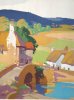
Welcome to Photoshop Gurus forum. Register a free account today to become a member! It's completely free. Once signed in, you'll enjoy an ad-free experience and be able to participate on this site by adding your own topics and posts, as well as connect with other members through your own private inbox!


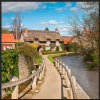
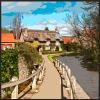
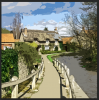
Here is one way that might work....
Open the image in Photoshop.
Make sure your image is in RGB mode.
Make a duplicate of the original.
Go to FILTER > ARTISTIC > POSTER EDGES set to 5, 0, and 1.
Add a Brightness & Contrast adjustment layer with the values of Brightness: 10 Contrast: 30.
Go to FILTER > ARTISTIC CUT OUT set to 7, 5, and 3.
original.....
View attachment 40064
Manipulated....
View attachment 40065
You can add a Hue and Sat adjustment layer and desat the image and also add a 1.0 Gaussian blur...
View attachment 40066
 Happy Simon in the UK!
that's probably accurate:mrgreen:Sam is one badass mother ain't he