What's new
Photoshop Gurus Forum

Welcome to Photoshop Gurus forum. Register a free account today to become a member! It's completely free. Once signed in, you'll enjoy an ad-free experience and be able to participate on this site by adding your own topics and posts, as well as connect with other members through your own private inbox!

RAW file size - details - coverage


ronyzmbow

New Member
Messages
2
Likes
1
I have started to use my new Olympus E-PL1 camera with RAW files.

I was not so pleased with the results in PSE ACR and Lightroom so I have decided to try THE SAME RAW file in Capture One Express and Raw Therapy.
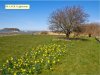
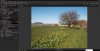
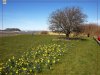
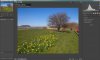
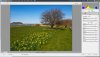
I was shocked to discover that the area covered with Capture One Express and Raw Therapy is larger than ACR and Lightroom - to my astonishment it is like having a wider lens - in all four corners of the image there more details and objects that cannot be seen in ACR! - notice a red car on the right side and a blue boat on the left side - it looks like either from a wider lens or like another file!
I have checked both in Photoshop ACR and Lightroom and the Lens Correction option is turned OFF.
Still kind of a small mystery to me...

See the attached images

I can hardly wait for comments!
 

Attachments

  • ACR Adobe Camera Raw.jpg
    ACR Adobe Camera Raw.jpg
    395 KB · Views: 1
  • Full ACR.jpg
    Full ACR.jpg
    468.4 KB · Views: 0
  • Capture One Express.jpg
    Capture One Express.jpg
    343.1 KB · Views: 1
  • compare CO ACR.jpg
    compare CO ACR.jpg
    1.3 MB · Views: 0
  • Raw Therapy.jpg
    Raw Therapy.jpg
    352.9 KB · Views: 0
In order to elaborate on the issue following some information I have collected from Luminous Landsacpe web site and Thomas Knoll, who is one of the original authors of Photoshop and the creator of Adobe Camera Raw.

" You may not realize it, but your digital camera does not give you every pixel that it records.
In most cases this is because the manufacturer masks off pixels at the very edges of the frame. This is done for a couple of technical reasons.
1. Many of the image processing algorithms (de-mosaicing, noise reduction, sharpening) that camera firmware (or raw conversion software) apply to raw sensor data are not "point operations", but instead "neighborhood operations". When computing the output value of that pixel, the algorithm needs to know not only the input value of that pixel, but also the input values of the pixels in the local neighborhood. The pixels at the very edge of the recorded image do not have a complete local neighborhood, so the algorithms need make some guess as to their value, which means that output results for these edge pixels will be not quite as accurate as the pixels a few pixels away from the edges. By trimming away these pixels, the camera manufacturers guarantee that all the output pixels are of maximum quality.
2. Sometimes image sensors do not have aspect ratios that exactly match the standard aspect ratios (3:2, 4:3, 16:9, etc.). In these cases, there are often different numbers of horizontal and vertical pixels hidden, to cause the final output image to have an exact ratio, When some users print digital camera images, they often do not bother to crop them, so having the camera output images with standard aspect ratios that exactly match standard paper dimensions is an advantage.
Solving this problem that few people knew even existed, Thomas Knoll, who is one of the original authors of Photoshop and the creator of Adobe Camera Raw, has written a free utility program which recovers all the pixels that any supported digital camera records, whether it's hidden edges or intentionally cropped formats. Called DNG Recover Edges, the utility application is unsupported, and it is not an Adobe product."

Another interesting comment came from a reader of my thread in DP Review web site forum:
" RAW images usually contain capture area of the entire sensor, while the intended viewing area is smaller. While capturing the image, both sets of dimensions are recorded with it. From what I have seen so far it is just a few pixels on each side, but your examples show quite substantial difference. The purpose of that is to simplify the conversion from RAW to Jpeg as the edges require different algorithms, as well as to discard the areas with the most quality issues (i.e. vignetting, CA, poor sharpness).
I've seen an utility that was making the full captured image available - simply by copying the tag describing the physical sensor dimensions into the image dimensions field, but I'm not sure if it would cover your camera's format. If I remember correctly it was working with .dng files only."
 

Back
Top