What's new
Photoshop Gurus Forum

Welcome to Photoshop Gurus forum. Register a free account today to become a member! It's completely free. Once signed in, you'll enjoy an ad-free experience and be able to participate on this site by adding your own topics and posts, as well as connect with other members through your own private inbox!

(Request) Photoshop request. portrait card pic.


Messages
7
Likes
0
Hi everyone, not too sure if this is too much. But I want to change the above pic to like a college access card pic. Not too sure if its possible. resolution isn't a big issue.

I have this pic that I want to turn :
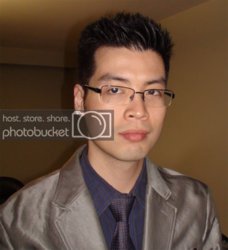
changeme.jpg


into a portrait card profile pic like this
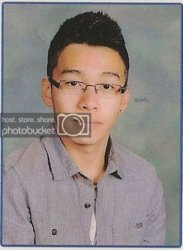
replace.jpg

thank you for anyone who can help~:)
 
There are a few ways I know that might work; First way, if you want same background cut and paste overlay pieces until the background is empty with border, then cut and past the new image you want on top. might want save then begin as a new picture to use brightening and contrast, and color tone to match the two a little better.
Here's what I did. I found a portrait background, cut and pasted your image on top, put a white border, then a smaller dusty blue one and stretched the face vertical a bit to be a rectangle.
fff.jpg
This is an example of what you can do with the instructions. you will have your own liberties to mess with image but it should work out.
 
There are a few ways I know that might work; First way, if you want same background cut and paste overlay pieces until the background is empty with border, then cut and past the new image you want on top. might want save then begin as a new picture to use brightening and contrast, and color tone to match the two a little better.
Here's what I did. I found a portrait background, cut and pasted your image on top, put a white border, then a smaller dusty blue one and stretched the face vertical a bit to be a rectangle.

This is an example of what you can do with the instructions. you will have your own liberties to mess with image but it should work out.


Wow, thank you it looks great!

I need to find a tutorial on cutting out picks (especially with spiky hair). Like I try to use magic wand and stuff but its so tricky ><
 
I could of done more detailed for your spiky hair but I was just doing it Quick And I only have a mouse. if you use different size brushes when cutting out your hair to make a more realistic look. also having a dark or shaded area near the hair so you can get the illusion of realistic spikes. I'm still learning but I noticed not every detail is necessary to have an alright job. of course the longer you spend on it,the higher the quality.
 
Last edited:

Back
Top