ballochboy
New Member
- Messages
- 2
- Likes
- 0
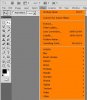
I have recently bought a new lap-top and after installing CS5 I noticed that I didn't have a tool which I would use from time to time. I used to access it via the Filter section it was next to filltery gallery, Lens correction, liquify and vanishing point. I think you have to download it but I forget what it's called (maybe smart extract) but Ill do my best to describe it for you. After you went into filter and picked it, it would open in a separate window then you could pick your brush size, go round the outside of an object. when you had finished going round the object you would select the paint bucket tool then ok. In the end it would give you the extracted part of the image you had selected.
Any help on this tool name in CS5 and how to obtain it would be much appreciated
cheers
Any help on this tool name in CS5 and how to obtain it would be much appreciated
cheers