
Photoshop Gurus Forum
Welcome to Photoshop Gurus forum. Register a free account today to become a member! It's completely free. Once signed in, you'll enjoy an ad-free experience and be able to participate on this site by adding your own topics and posts, as well as connect with other members through your own private inbox!
You are using an out of date browser. It may not display this or other websites correctly.
You should upgrade or use an alternative browser.
You should upgrade or use an alternative browser.
Stitch/blend multiple photos into one panoramic photo
- Thread starter jkronos
- Start date
Smokey2011
Well-Known Member
- Messages
- 119
- Likes
- 5
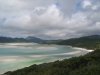
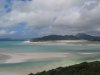
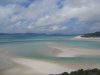
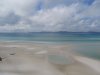
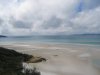
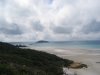
that's a long, long poster.
what dimensions do you need this in terms of horizontal format?
what dimensions do you need this in terms of horizontal format?
There is a bit of overlap with each photo, so it should've be too long, heh.
I was thinking I'd get this printed on canvas, using canvaspop.com (groupon/livingsocial deal).
Based on their standard choices, I was hoping to fit this on an 18"x48" print. I can, however choose custom sizes if necessary.
I was thinking I'd get this printed on canvas, using canvaspop.com (groupon/livingsocial deal).
Based on their standard choices, I was hoping to fit this on an 18"x48" print. I can, however choose custom sizes if necessary.

ibclare
Queen Bee
- Messages
- 9,890
- Likes
- 4,028
Hi jkronos, welcome to PSG. Here is a link to one of our weekly challenges that focused on panoramas and Photoshop Photomerge:
http://www.photoshopgurus.com/forum...hotoshop-gurus-forum-challenge-week-17-a.html
or are you asking for someone to do this for you? It's not clear. Thanks.
http://www.photoshopgurus.com/forum...hotoshop-gurus-forum-challenge-week-17-a.html
or are you asking for someone to do this for you? It's not clear. Thanks.

ibclare
Queen Bee
- Messages
- 9,890
- Likes
- 4,028
That's OK jkronos. It would be helpful if you'd go back into your first post before the pictures and add that this is a request for someone to do this for you. Then you won't get people replying before they read down all the way or miss your reply altogether. Thanks, that should save you some headaches.
Yeah, I realized I had forgotten the request part right after I initially posted. I cannot find an edit button to change anything though.That's OK jkronos. It would be helpful if you'd go back into your first post before the pictures and add that this is a request for someone to do this for you. Then you won't get people replying before they read down all the way or miss your reply altogether. Thanks, that should save you some headaches.
Smokey2011
Well-Known Member
- Messages
- 119
- Likes
- 5
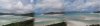
are you looking for a horizontal blend as abruptly as the attached image or do you need something more gradual?

Hoogle
Guru
- Messages
- 7,940
- Likes
- 2,488
This is what it will look like this is reduced in size I have left a slight edge on either side to give you the option to clone in some more or not
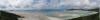
Here is the full sized version in Rar format
View attachment Untitled_Panorama1.rar
Here is the full sized version in Rar format
View attachment Untitled_Panorama1.rar
Smokey2011
Well-Known Member
- Messages
- 119
- Likes
- 5
more like this I suppose:
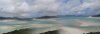
Beautiful, thank you!This is what it will look like this is reduced in size I have left a slight edge on either side to give you the option to clone in some more or not
View attachment 14704
Here is the full sized version in Rar format
View attachment 14706
I don't want to be a bother, but is there anything you guys think might need enhanced in these photos?
Smokey2011
Well-Known Member
- Messages
- 119
- Likes
- 5
ok i get it now. my fault.
you want all 6 images pasted together side by side.
it seemed that you wanted all 6 photos blended into one another horizontally with a fade/in fade/out on each edge of each photo
you want all 6 images pasted together side by side.
it seemed that you wanted all 6 photos blended into one another horizontally with a fade/in fade/out on each edge of each photo
Hoogle
Guru
- Messages
- 7,940
- Likes
- 2,488
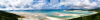
Well I dont like to edit landscape photography to much I would however colour correct it slightly and sharpen it but it may come out worse as the images you provided are not high resolution they are large but not high resolution most of them being less than 1MB in size.
Hoogle
Guru
- Messages
- 7,940
- Likes
- 2,488
@ Smokey2011 yes if it was my images then I would spend more time on it and have it corrected. Here we do the free request if we want to do them anything that is a bigger job it is there choice if they want to post in the freelance section and are willing to pay.
I think people understand free work has very little time put into it as this took less than 5 mins I dont see the problem.
I have deleted your last post as it is down to individual members if they want to work for free or not. This is what makes us 1 of the better and largest photoshop forums on the web as we are willing to do freebies or teach etc.
But then we have the freelance section for people who want more effort and professional images provided or logo design etc.
I think people understand free work has very little time put into it as this took less than 5 mins I dont see the problem.
I have deleted your last post as it is down to individual members if they want to work for free or not. This is what makes us 1 of the better and largest photoshop forums on the web as we are willing to do freebies or teach etc.
But then we have the freelance section for people who want more effort and professional images provided or logo design etc.
