gedstar
Guru
- Messages
- 4,362
- Likes
- 4,530
It would appear Adobe have introduced a new bug in the Liquify Filter
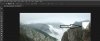
Apparently if you open an image and change the mode to 16bit, make an adjustment with the Liquidfy Filter and return to Photoshop you get a white square around that area, this only happens if you use 16bit mode, 8bit mode is fine
I was able to replicate it
Update
Unchecking Use Graphics Processor in preferences and restarting Photoshop is a temporary fix!
Ged
Apparently if you open an image and change the mode to 16bit, make an adjustment with the Liquidfy Filter and return to Photoshop you get a white square around that area, this only happens if you use 16bit mode, 8bit mode is fine
I was able to replicate it
Update
Unchecking Use Graphics Processor in preferences and restarting Photoshop is a temporary fix!
Ged
Last edited: