
What's new
Photoshop Gurus Forum

Welcome to Photoshop Gurus forum. Register a free account today to become a member! It's completely free. Once signed in, you'll enjoy an ad-free experience and be able to participate on this site by adding your own topics and posts, as well as connect with other members through your own private inbox!

'Fill Path' in PS CS6


JoHubb

New Member
Messages
3
Likes
0
Hello, thanks for having me on these boards.

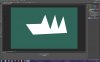
I am trying to fill the inside of a path with foreground (dark green) colour. No matter what I do, instead of filling the path, CS6 fills the area outside the path! Frustrating would be an understatement! (see attached)

I must have missed something obvious, but what? I followed Adobe's instructions exactly but perhaps during previous work I changed some default setting.

I'd be grateful for advice.

John
 

Attachments

  • Fill_Path.jpg
    Fill_Path.jpg
    142.7 KB · Views: 1
When you made your shape did you use the pen tool or a selection tool. if it was a selection tool was it inverted if it is or was once you go to fill your path and it will fill the outside surroundings
 
When you made your shape did you use the pen tool or a selection tool. if it was a selection tool was it inverted if it is or was once you go to fill your path and it will fill the outside surroundings

Thanks, I used the Pen tool - path option not shapes.

I tried making a selection from the path but the fill option button then got blocked and the Path menu option got greyed out. I guess this is not surprising as by then my drawing was a selection and not a path.
 
See the top panel where it says "Path"....

Try turning it to "Shape" and see what happens.

Ha! Now we're getting somewhere. It fills with foreground colour as the anchor points are made. Looks like a mess till the shape is completed.

As far as I recall, this is a change from CS3.

Seems I've got a solution. Many thanks Inkz and iDad.

John
 
Yeah same, but when the path is complete, it's filling the inside not the outside. Pleased to help...
 

Back
Top