Hi all,
I recently purchased a new printer (a Brother MFC-J5910DW all-in-one wireless A3 I believe) and when I print from Photoshop, the colours / image comes out awful and I mean that bad that I spent a long time playing with cleaning the ink cartridges on the printer as I thought it was a blocked cartrdige. It was only after I printed directly from the windows explorer that I discovered it was Photoshop that was the issue.
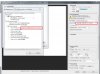
I tried playing around with the colour management (between "printer manages colour" & "photoshop manages colours" and played with the individual settings. I also tried playing with the colour settings through "Edit>Colour Settings" & tried a few different options in there and it seemed to make no difference. I tried saving the PSD as a JPEG and re-opening then printing and again no difference. I also tried opening the same JPEG in Serif Photoplus and that printed perfectly.
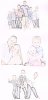
I've seen a lot of disscussions about prints not matching screen colours which I understand but haven't found anything like this. The images below demonstrate what I am referring to, they are scans of the prints. Excuse the bits of writing / print on the images, these were test copies just done at low quality on pre-used paper just to make sure my mother was happy with the layout (I did also try printing in high quality aswell and his made no difference).

I recently purchased a new printer (a Brother MFC-J5910DW all-in-one wireless A3 I believe) and when I print from Photoshop, the colours / image comes out awful and I mean that bad that I spent a long time playing with cleaning the ink cartridges on the printer as I thought it was a blocked cartrdige. It was only after I printed directly from the windows explorer that I discovered it was Photoshop that was the issue.
I tried playing around with the colour management (between "printer manages colour" & "photoshop manages colours" and played with the individual settings. I also tried playing with the colour settings through "Edit>Colour Settings" & tried a few different options in there and it seemed to make no difference. I tried saving the PSD as a JPEG and re-opening then printing and again no difference. I also tried opening the same JPEG in Serif Photoplus and that printed perfectly.
I've seen a lot of disscussions about prints not matching screen colours which I understand but haven't found anything like this. The images below demonstrate what I am referring to, they are scans of the prints. Excuse the bits of writing / print on the images, these were test copies just done at low quality on pre-used paper just to make sure my mother was happy with the layout (I did also try printing in high quality aswell and his made no difference).