
Photoshop Gurus Forum
Welcome to Photoshop Gurus forum. Register a free account today to become a member! It's completely free. Once signed in, you'll enjoy an ad-free experience and be able to participate on this site by adding your own topics and posts, as well as connect with other members through your own private inbox!
You are using an out of date browser. It may not display this or other websites correctly.
You should upgrade or use an alternative browser.
You should upgrade or use an alternative browser.
Post Pic Ridiculously Realistic Scorching Fire Effect!
- Thread starter lookatthisguy
- Start date

- Messages
- 24,260
- Likes
- 13,720
After your back up step, you should still have the original text letters on their own individual layers and layer styles. Since the letters have already been rasterized, there's no need to do this again. You can rasterize the layer style (to the letter) if you choose.
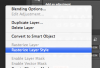
Do not choose the "Flatten Image"!!!! This refers to the entire image and not an single layer!
Do not choose the "Flatten Image"!!!! This refers to the entire image and not an single layer!
lookatthisguy
Active Member
- Messages
- 26
- Likes
- 2
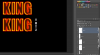
Gotcha. Here's what I have so far...
lookatthisguy
Active Member
- Messages
- 26
- Likes
- 2
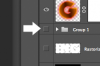
Now I've Rasterized Layer for all four...
lookatthisguy
Active Member
- Messages
- 26
- Likes
- 2
I hid it... Now the eraser tool part.. what Shape, Size and Hardness should I use.. says use a variety....

lookatthisguy
Active Member
- Messages
- 26
- Likes
- 2
Ok, I would use a round, soft (which is a hardness of 0) brush (eraser) around a 200 size. Set the opacity to about 30%.
View attachment 38552
OK, I did that but I ended up erasing too much off the letter. How come in Photoshop you can only undo the very last thing you did and not multiple undos? Is there a way to revert and start over from the full opacity letter? This is frustrating... In Illustrator you can undo as many times as you want...
lookatthisguy
Active Member
- Messages
- 26
- Likes
- 2
Remember, you can use the OPTION + COMMAND + Z to undo things!
Oh, I see. You have to hold down CTRL + ALT. I use Windows version...
lookatthisguy
Active Member
- Messages
- 26
- Likes
- 2
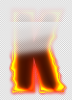
So this is what my 'K' looks like:
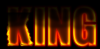
I don't understand what happened here. There's this ugly box up at the top. How'd that happen? Anyone know?
I don't understand what happened here. There's this ugly box up at the top. How'd that happen? Anyone know?
lookatthisguy
Active Member
- Messages
- 26
- Likes
- 2
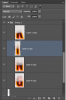
muh layers
lookatthisguy
Active Member
- Messages
- 26
- Likes
- 2
Here it is close up:
lookatthisguy
Active Member
- Messages
- 26
- Likes
- 2
Again, my fault. I need to see all of your layers.
What I don't understand is how are you working from inside a group? Your grouped letters should have been your back up.
I messed up so I had to use my backup

Here I fixed my layers. So now I'm not working in a group.
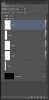
Group 1 and 2 are my messups