
Photoshop Gurus Forum
Welcome to Photoshop Gurus forum. Register a free account today to become a member! It's completely free. Once signed in, you'll enjoy an ad-free experience and be able to participate on this site by adding your own topics and posts, as well as connect with other members through your own private inbox!
You are using an out of date browser. It may not display this or other websites correctly.
You should upgrade or use an alternative browser.
You should upgrade or use an alternative browser.


dv8_fx
Retired Administrator
- Messages
- 12,219
- Likes
- 3,713
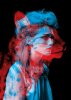
What I see is a two layered image.... the ocelot cat in black and red and girl with more emphasis on blue on her clothing and hair.
My guess is the cat layer is on multiply mode.
The photos have to have an exact angle to get the girl's hair lined up on the cat's head and for the cat's stripes to be spot on the girl's cheekbones, lips and chin.
Good composition tho i would like the girl's profile shot more on the side so her eye would have lined up to the cat's.... then again the stripes wont line up nicely.....
Hope this helps you.
My guess is the cat layer is on multiply mode.
The photos have to have an exact angle to get the girl's hair lined up on the cat's head and for the cat's stripes to be spot on the girl's cheekbones, lips and chin.
Good composition tho i would like the girl's profile shot more on the side so her eye would have lined up to the cat's.... then again the stripes wont line up nicely.....
Hope this helps you.
dv8_fx
Retired Administrator
- Messages
- 12,219
- Likes
- 3,713
What I have here was an RGB popcorn image ... (lol... sorry couldn't find anything better).... converted to grayscale. converted back to RGB .... created a new layer fill with red and node set to darken....
View attachment 4091
so you have one layer element.....
now for a girl.... still looking.....
View attachment 4091
so you have one layer element.....
now for a girl.... still looking.....
dv8_fx
Retired Administrator
- Messages
- 12,219
- Likes
- 3,713
Couldn't find a girl.... so I used the popcorn....
View attachment 4092
As you can see, I lowered the opacity of the top layer... no blending modes involved.
View attachment 4092
As you can see, I lowered the opacity of the top layer... no blending modes involved.
dv8_fx
Retired Administrator
- Messages
- 12,219
- Likes
- 3,713
Not desaturate....
convert the RGB image to greyscale (converting will lose the color channels).... convert back to RGB (but will still be in black and white ) .... fill a new layer with color and set the layer mode to darken..... flatten image.
When you have all the images needed.... create a new document and drag the new images into the new document. Play with the opacities , layer orders, and if need be, the layer modes.....
convert the RGB image to greyscale (converting will lose the color channels).... convert back to RGB (but will still be in black and white ) .... fill a new layer with color and set the layer mode to darken..... flatten image.
When you have all the images needed.... create a new document and drag the new images into the new document. Play with the opacities , layer orders, and if need be, the layer modes.....
Last edited: