What's new
Photoshop Gurus Forum

Welcome to Photoshop Gurus forum. Register a free account today to become a member! It's completely free. Once signed in, you'll enjoy an ad-free experience and be able to participate on this site by adding your own topics and posts, as well as connect with other members through your own private inbox!

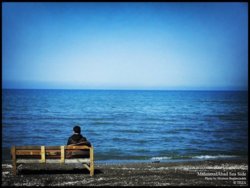
Hello :) How can I get this effect please?


The effect is a vignette. Various ways to do it, one way is Filter-Lens Correction. Click the Custom tab and move the sliders in the Vignette section. To the left darkens, to the right lightens. Midpoint changes the area.
 
Another way to do this, which is very easy, but it doesn't specify the area unless you select the whole area is inner shadow. If you want it on the bg, you can go to the background layer > Blending Options > Inner Shadow and fool with that.
 
To do this- Right Click Background Layer > Blending Options > Inner Shadow and make Distance: 8; Choke: 28; Size: 73.
 

Back
Top