
Michelia Vivian
New Member
- Messages
- 1
- Likes
- 0
Hello!
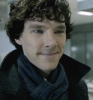
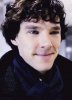
I am a newbie and confused with these photoes. As you can see, first image is original and the other has been retouched in photoshop, which made it more beautiful. I would love to know the techniques. please tell me what I need to do to get the result like this. If it's okay, please send me psd file so that I could know for certain how it worked. I would really appreciated.
Thanks in advance !!!
I am a newbie and confused with these photoes. As you can see, first image is original and the other has been retouched in photoshop, which made it more beautiful. I would love to know the techniques. please tell me what I need to do to get the result like this. If it's okay, please send me psd file so that I could know for certain how it worked. I would really appreciated.
Thanks in advance !!!
Last edited:
